%20scale(0.1939)%22%20fill%3D%22%23000%22%20d%3D%22M0%2064.2%2025.8%2036.8Q29%2033.4%2031%2030.7Q33%2028%2033.9%2025.6Q34.8%2023.2%2034.8%2020.7Q34.8%2016%2031.75%2013.35Q28.7%2010.7%2024%2010.7Q19%2010.7%2015.2%2013.2Q11.4%2015.7%208.4%2021L0.4%2014.4Q4.5%207.3%2010.5%203.65Q16.5%200%2024.4%200Q30.9%200%2035.8%202.6Q40.7%205.2%2043.4%209.85Q46.1%2014.5%2046.1%2020.6Q46.1%2025%2045.05%2028.45Q44%2031.9%2041.5%2035.35Q39%2038.8%2034.6%2043.4L14.8%2063.9ZM0%2071V64.2L9.9%2060.7H47.5V71ZM79.3%2061Q72.2%2061%2066.45%2057.7Q60.7%2054.4%2057.4%2048.7Q54.1%2043%2054.1%2036Q54.1%2028.9%2057.4%2023.25Q60.7%2017.6%2066.45%2014.3Q72.2%2011%2079.3%2011Q84.9%2011%2089.75%2013.15Q94.6%2015.3%2098%2019.3L90.8%2026.6Q88.7%2024.1%2085.75%2022.85Q82.8%2021.6%2079.3%2021.6Q75.2%2021.6%2072.05%2023.45Q68.9%2025.3%2067.15%2028.5Q65.4%2031.7%2065.4%2036Q65.4%2040.2%2067.15%2043.45Q68.9%2046.7%2072.05%2048.55Q75.2%2050.4%2079.3%2050.4Q82.8%2050.4%2085.75%2049.15Q88.7%2047.9%2090.8%2045.4L98%2052.7Q94.6%2056.7%2089.75%2058.85Q84.9%2061%2079.3%2061ZM74.6%2070V2H82.6V70Z%22%2F%3E%3C%2Fmask%3E%3Crect%20width%3D%2232%22%20height%3D%2232%22%20fill%3D%22rgb(198%2C83%2C61)%22%20mask%3D%22url(%23cut)%22%2F%3E%3C%2Fsvg%3E)
Custom questions: ask one thing, where it matters
Write your own question in the dashboard and open it from any link, button or line of code on your site, or show it in the widget on every page. One question, one answer, a rating if you want one, arriving with the page it was asked on. Included on the free plan.
A custom question is a question you write yourself, such as "Which brand are we missing?", and put where it belongs. A link or a button on a page opens it, or the widget shows it on every page. The visitor answers in a sentence, and the answer lands in your inbox with the address of the page it came from.
Custom questions are included on the free plan.
Why I built it
The widget's four choices (report a bug, suggest an idea, ask a question, leave a review) each have a purpose, and they cover most of what visitors want to tell you. But some of what I want to know is specific to one page, or to one moment, and nobody reads four general choices and works out that one of them is the place to say "you're missing a brand".
So I ask instead. A question on the page, in my words, brings back answers that fit the page. It also lets visitors talk to me in another way than through the button in the corner: a link in a sentence, in an article, under a listing, opens a small panel with one question, and the answer takes seconds.
An example: a mistake isn't a bug
Say your site lists information: brands, products, opening hours, historical facts. A visitor notices that a detail is wrong. Your page says a brand only sells unisex clothing, and it actually has a men's range and a women's range.
The site works, so it isn't a bug. It isn't an idea either. That visitor won't go through four choices to tell you, but a line under the details, "Something wrong here?", asks them exactly that.
<a href="#" data-twocents-open="report-a-mistake">Something wrong here?</a>
The answer comes back with the address of the page it was sent from, so you know which brand they meant without asking.
A real one: my cycling directory
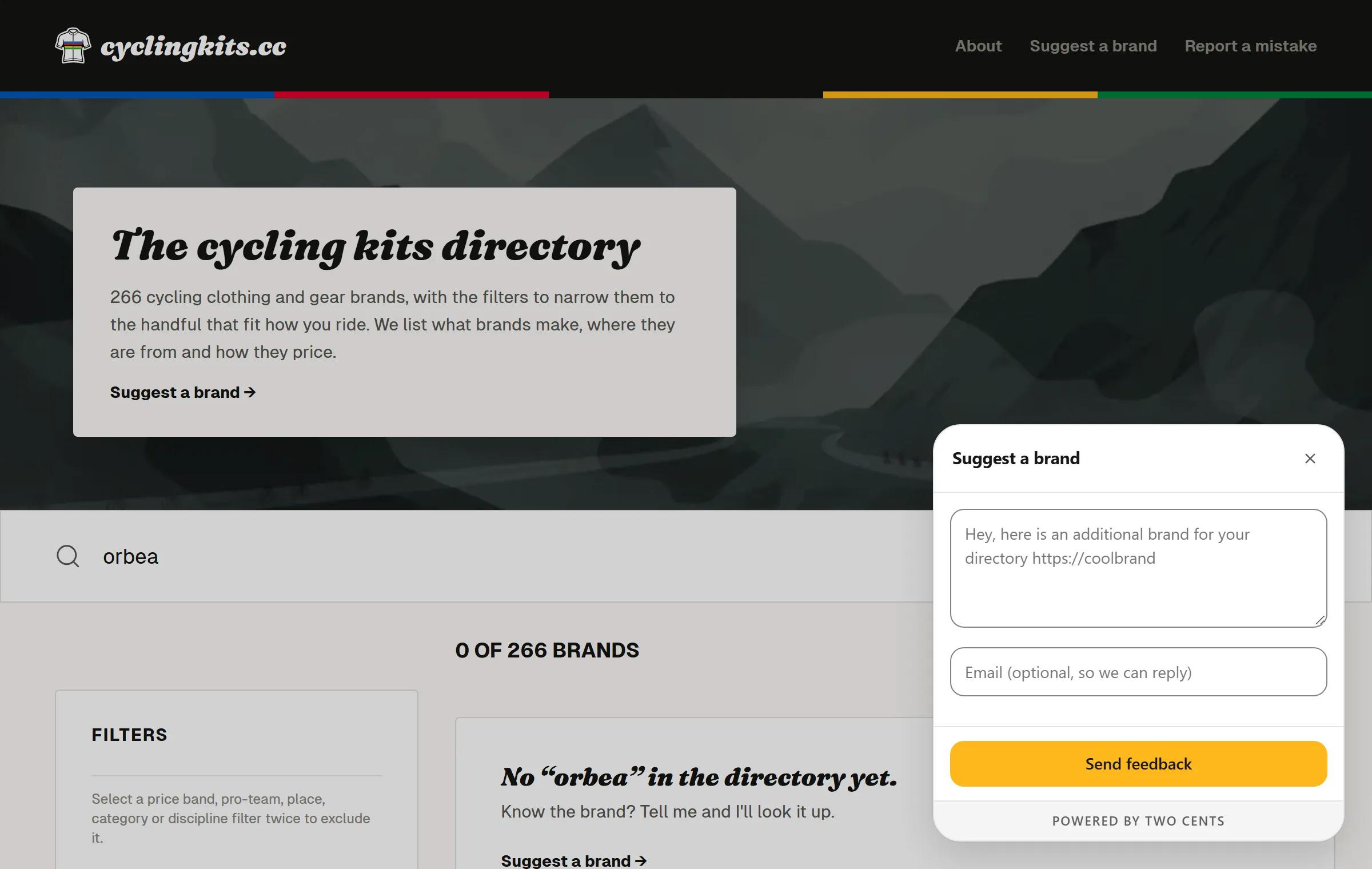
cyclingkits.cc is my directory of cycling clothing brands. It has two custom questions: one asks visitors to add a missing brand, the other to report a mistake. By mid-October 2026, adding a missing brand had brought in about forty answers, and a new one arrives most days. It works far better than I expected, and I'm still surprised and excited every time I read one. Reporting a mistake has had none so far.
On one page, or on every page
On its page
Every question gets a key, and any link or button on your site opens it with that key, with no JavaScript to write. A different question can sit on every page, with one install and one inbox.
In the widget, on every page
Tick "Show it in the widget panel" and the question appears in the widget's own menu, next to the four choices, wherever the widget is. That suits a question about the whole site or about something you just changed: "What do you think of our new design?", or "We've reorganised the catalogue. Can you find what you're looking for?" A question can be in the widget and behind a link at the same time.
Only your questions
Your questions can come before or after the four choices, and you can switch the four choices off so the widget offers nothing but your questions. When there is a single thing to offer, the button opens it directly. The dashboard warns you past six rows, because visitors would have to scroll on a phone, and the limit is eight.
No button at all
In stealth mode the button disappears and your questions open only from your own links. The panel then opens in the middle of the screen over a darkened page, so it reads as part of the page and not as a glitch. That's the setup for asking one precise question without a feedback widget in the corner.
At a given moment
Your own code can open a question when something happens: after the third step of a sign-up, or when someone cancels.
twocents('open', 'where-stuck');
Writing one
In the dashboard you write the question the visitor reads, an example answer shown in the empty field if you want one, and a short label only you see. The visitor gets one free-text field.
A rating, and a testimonial
A question can also ask for one to five stars, and for the visitor's consent to show their answer as a testimonial. Both are off until you switch them on.
Say you've just released a feature, or reworked one. You ask "What do you think of the new export?" on the page where it lives, or in the widget. Visitors give it stars and say why. You read the average and every answer in your inbox, and the answers whose authors said yes can appear on your site, on the page that sells the feature. Showing them is the job of the testimonial widget.
What comes back
The answer arrives in the same inbox as everything else, with the page address, the browser, the screen size and the language. The inbox has a filter for each question, and the export (CSV or JSON) has a column with the question as it was worded when the visitor answered it.
That wording stays with each answer. If you reword a question, its old answers keep the words they were answering, and deleting the question doesn't delete them. Questions live in the dashboard, so changing one never needs a deploy: every page running the tag follows within a minute.
What it doesn't do
- A question gets one free-text answer, with stars and a name if you ask for them. It isn't a form with fields, and it isn't a survey with several questions or branching.
- Nothing opens by itself, after a delay, when someone moves to leave, or on pages that match a pattern. A visitor opens the question, or your code does.
- The widget speaks five languages, but your question shows as you wrote it, in one language.
Where to start
If you don't know what to ask yet, I sorted thirty questions by the page they belong on in Website feedback questions, and why one question is enough is in One-question surveys. The widget itself, its four choices and the context it attaches, is on the feedback widget page, and the script tag is on the install page.
Two Cents is free for one site and 25 messages a month, with custom questions included.