%20scale(0.1939)%22%20fill%3D%22%23000%22%20d%3D%22M0%2064.2%2025.8%2036.8Q29%2033.4%2031%2030.7Q33%2028%2033.9%2025.6Q34.8%2023.2%2034.8%2020.7Q34.8%2016%2031.75%2013.35Q28.7%2010.7%2024%2010.7Q19%2010.7%2015.2%2013.2Q11.4%2015.7%208.4%2021L0.4%2014.4Q4.5%207.3%2010.5%203.65Q16.5%200%2024.4%200Q30.9%200%2035.8%202.6Q40.7%205.2%2043.4%209.85Q46.1%2014.5%2046.1%2020.6Q46.1%2025%2045.05%2028.45Q44%2031.9%2041.5%2035.35Q39%2038.8%2034.6%2043.4L14.8%2063.9ZM0%2071V64.2L9.9%2060.7H47.5V71ZM79.3%2061Q72.2%2061%2066.45%2057.7Q60.7%2054.4%2057.4%2048.7Q54.1%2043%2054.1%2036Q54.1%2028.9%2057.4%2023.25Q60.7%2017.6%2066.45%2014.3Q72.2%2011%2079.3%2011Q84.9%2011%2089.75%2013.15Q94.6%2015.3%2098%2019.3L90.8%2026.6Q88.7%2024.1%2085.75%2022.85Q82.8%2021.6%2079.3%2021.6Q75.2%2021.6%2072.05%2023.45Q68.9%2025.3%2067.15%2028.5Q65.4%2031.7%2065.4%2036Q65.4%2040.2%2067.15%2043.45Q68.9%2046.7%2072.05%2048.55Q75.2%2050.4%2079.3%2050.4Q82.8%2050.4%2085.75%2049.15Q88.7%2047.9%2090.8%2045.4L98%2052.7Q94.6%2056.7%2089.75%2058.85Q84.9%2061%2079.3%2061ZM74.6%2070V2H82.6V70Z%22%2F%3E%3C%2Fmask%3E%3Crect%20width%3D%2232%22%20height%3D%2232%22%20fill%3D%22rgb(198%2C83%2C61)%22%20mask%3D%22url(%23cut)%22%2F%3E%3C%2Fsvg%3E)
Free website feedback widget: one script tag, the context attached
A feedback widget for your website. Visitors report a bug, suggest an idea or ask a question in a sentence, and the page, the browser and a screenshot come with it. Free for one site, no card.
Two Cents is a feedback widget for websites. You paste one script tag, a small button appears in a corner of your site, and the people using it can tell you what is broken, missing or unclear. Each message arrives with the page it was written on, the browser, the screen size and, if the visitor wants, a screenshot. A bug report also brings the console errors and failed requests from before they clicked.
It is free for one site and 25 messages a month. No card, and no trial that runs out.
Why I built it
I'm a UX designer and a digital product manager, and the first rule of that job is that you are not your users. You build a site for other people, in your own words, and you know your product too well to see what a stranger trips over. So something doesn't work, or isn't understood, and the visitor leaves without saying anything.
I wanted to hear from the real people using my sites: what works, mostly what doesn't, and the ideas they have. That is what tells me what to fix first and what to build next. A widget on the page is the shortest way I know to get a visitor's thought onto my list.
Who it is for
Anyone with something online they want to improve: a directory, an online shop, a SaaS, a blog, or a studio that looks after its clients' sites. The person writing to you should have as little as possible in the way, and you should be able to act on what they wrote the same day.
It is not a tool for testing a site with your team before launch. The people who write are the ones using your live site.
What a visitor sees
- A small button in a bottom corner, with a label you choose. On a phone it tucks against the side edge, clear of the cookie banner and the "Add to cart" bar.
- Four choices: report a bug, suggest an idea, ask a question, or leave a review with one to five stars. You can switch any of them off.
- An optional email field, so you can write back. You can remove it if you want anonymous feedback.
- The form in their own language, picked from their browser: English, French, Dutch, German or Spanish.
- Nothing that pops up by itself. The widget waits to be opened.
- What they typed is still there if they close the panel by mistake.
What arrives with each message
The visitor writes one sentence. Everything below comes along without them typing it.
- The page address, and the page they came from.
- Their browser, operating system and language, the size of the window and the screen, the time zone, and how long the page took to load.
- On a bug report, the last 25 console errors and warnings, the last 15 requests that failed (method, status, path and duration), and any picture, script or stylesheet that didn't load. Query strings, request bodies and headers are never read.
- A screenshot, if they want to add one. On a computer it takes one click and shows what they were looking at. On a phone, browsers can't capture the page, so the visitor attaches a screenshot from the phone. It is scaled down before sending, which also removes the photo's location data.
"The form doesn't send" then arrives with the page, Safari on iOS, and the error that fired when they pressed Send. My reply is a fix, not "which page do you mean?"
An example: the size chart
Picture an online clothing shop. A visitor opens the size chart, and it's a table of centimetres they can't make sense of. They open the widget and write: "I looked at the size chart and I can't work it out. I usually wear an M."
If they left an email, you can answer that afternoon and help them choose. But the first sentence is worth more than that one sale. It tells you the size chart doesn't work. You rewrite it, or add a short size finder, and the next visitors find their size on their own.
A real one: my cycling directory
cyclingkits.cc is my directory of cycling clothing brands. A visitor searches for a brand, it isn't listed, and they send me its name. I could find that search in my analytics if I read every query. Here, the visitor tells me.
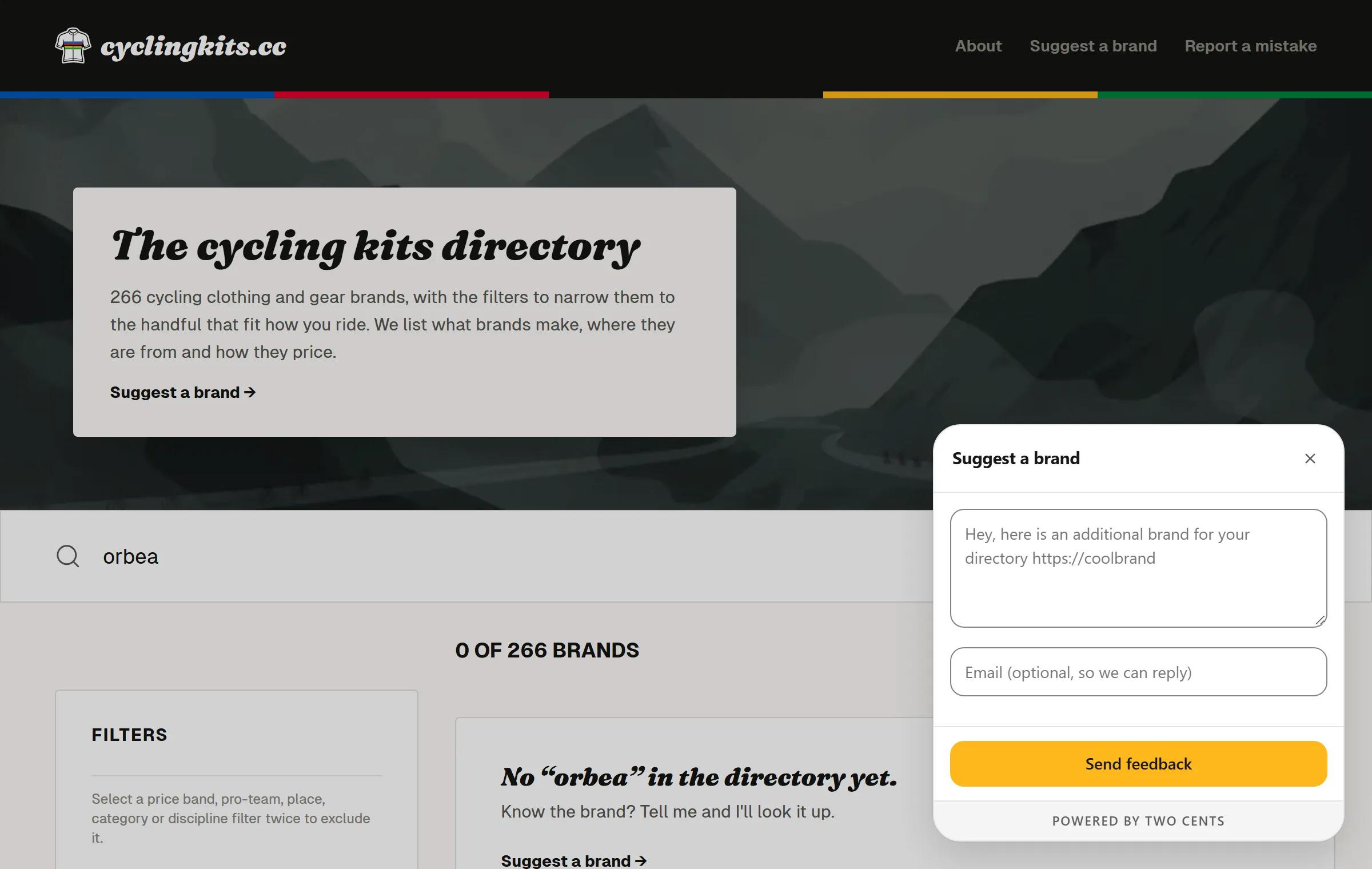
Between 13 and 21 September 2026, 31 answers came in, three of them from the empty search results. Ideas came too: one pointed out that the country list wasn't sorted, which no analytics tool would have shown me. The directory has since grown from 191 to 266 brands, some named by visitors and the rest found in research their answers sent me on.
Someone on Reddit once suggested listing where each brand makes its clothing. That's the kind of idea the widget is there to catch, on the page where it occurs to people.
Your own questions, on the page they're about
The button hears from people who already have something to say. A question placed on a page hears from the others. You write it in the dashboard, and any link or button on your site opens it:
<a href="#" data-twocents-open="suggest-a-brand">Missing a brand?</a>
The answer comes back with the page address, so you know which product or article it was about. Thirty questions, sorted by the page they belong on, are in Website feedback questions.
Light, and a guest on your site
- It is under 17 kB gzipped, loaded with
defer, with no dependencies. - It runs inside a Shadow DOM, so your CSS can't break it and it can't break yours.
- It sets no cookies, uses no local storage and makes no request to anyone but Two Cents. There's nothing to add to your cookie banner. Messages and screenshots are stored in France.
- It meets WCAG AA contrast in light and dark, works fully from the keyboard, and has labels for screen readers.
- It takes your accent colour, and can follow each visitor's light or dark setting.
One script tag
<script src="https://twocentsbox.com/twocents.js" data-twocents="pk_your_key" defer></script>
It goes before </body> and works on plain HTML, WordPress, Webflow, Framer, Shopify, Next.js, React, Vue or Svelte. Settings and questions live in the dashboard, so changing them never needs a deploy. When you add a site, the setup waits for the widget to load on one of your pages and tells you it's live. The details are on the install page.
What's free, and what isn't
| Free | Pro | |
|---|---|---|
| Sites | 1 | 3, 7, 15 or 31 |
| Domains per site | 1 | 3 |
| Messages | 25 a month; the rest are kept, not refused, until you upgrade | Not counted |
| Context, screenshots, console errors, your own questions | Yes | Yes |
| Email notifications | A daily digest | Each message, every 15 minutes, or daily |
| Slack and Discord | No | Yes |
| "Powered by Two Cents" | Shown | Removable |
| Price | Free, no card | From €12 a month for three sites ($15 outside Europe) |
What it doesn't do
- There are no comments pinned to page elements and no Jira or Linear sync, because it isn't built for a team reviewing a site before launch.
- There's no public voting board or roadmap.
- Nothing opens after a delay or when someone moves to leave. Visitors open it when they want to.
- Five languages is all it speaks, where some widgets offer forty.
Comparing widgets
If you're choosing, I compared Two Cents with Feedback Fish and Ybug, and listed eight tools in Best website feedback tools in 2026.
Two Cents is free for one site and 25 messages a month, with screenshots, console errors and your own questions included.