%20scale(0.1939)%22%20fill%3D%22%23000%22%20d%3D%22M0%2064.2%2025.8%2036.8Q29%2033.4%2031%2030.7Q33%2028%2033.9%2025.6Q34.8%2023.2%2034.8%2020.7Q34.8%2016%2031.75%2013.35Q28.7%2010.7%2024%2010.7Q19%2010.7%2015.2%2013.2Q11.4%2015.7%208.4%2021L0.4%2014.4Q4.5%207.3%2010.5%203.65Q16.5%200%2024.4%200Q30.9%200%2035.8%202.6Q40.7%205.2%2043.4%209.85Q46.1%2014.5%2046.1%2020.6Q46.1%2025%2045.05%2028.45Q44%2031.9%2041.5%2035.35Q39%2038.8%2034.6%2043.4L14.8%2063.9ZM0%2071V64.2L9.9%2060.7H47.5V71ZM79.3%2061Q72.2%2061%2066.45%2057.7Q60.7%2054.4%2057.4%2048.7Q54.1%2043%2054.1%2036Q54.1%2028.9%2057.4%2023.25Q60.7%2017.6%2066.45%2014.3Q72.2%2011%2079.3%2011Q84.9%2011%2089.75%2013.15Q94.6%2015.3%2098%2019.3L90.8%2026.6Q88.7%2024.1%2085.75%2022.85Q82.8%2021.6%2079.3%2021.6Q75.2%2021.6%2072.05%2023.45Q68.9%2025.3%2067.15%2028.5Q65.4%2031.7%2065.4%2036Q65.4%2040.2%2067.15%2043.45Q68.9%2046.7%2072.05%2048.55Q75.2%2050.4%2079.3%2050.4Q82.8%2050.4%2085.75%2049.15Q88.7%2047.9%2090.8%2045.4L98%2052.7Q94.6%2056.7%2089.75%2058.85Q84.9%2061%2079.3%2061ZM74.6%2070V2H82.6V70Z%22%2F%3E%3C%2Fmask%3E%3Crect%20width%3D%2232%22%20height%3D%2232%22%20fill%3D%22rgb(198%2C83%2C61)%22%20mask%3D%22url(%23cut)%22%2F%3E%3C%2Fsvg%3E)
Website feedback questions: 30 to ask, and the page each belongs on
Thirty website feedback questions sorted by the page they belong on, from pricing to the 404, with three rules for wording them and what one question brought in on my own site.
By Sylvain
Most lists of website feedback questions are survey questions. "How would you rate your experience today?" "How likely are you to recommend us?" They are written for everybody, on any page, and they usually arrive in a popup.
I think the page matters more than the wording. "Is anything unclear?" means nothing in a popup on the home page. Under a pricing table, the same question gets you the sentence your plans forgot to say. So I sorted this list by page. There are thirty questions, and each one comes with the place it belongs.
I'm a UX designer and I make a feedback widget, Two Cents, and it is built around this idea. The questions work with any tool, or with a plain form.
Three rules before you write one
Ask whether, not what. "What is unclear about our plans?" tells the visitor that something is unclear. People are obliging, so they will find something. "Is anything missing or unclear about our plans?" leaves room for "no", and a "no" tells you something too.
Don't ask what your analytics already show. You know which step of a flow people abandon. Asking "Where did you get stuck?" spends a visitor's goodwill on a fact you have. The numbers can't show you whether something at that step was unclear, or why, so ask that.
Ask one thing, and interrupt nobody. One question, with one free-text answer. It sits on the page as a link or a line of text, and the visitor who has something to say opens it. Nielsen Norman Group's guidelines on asking for feedback advise against a request that cuts into a task, and suggest something that is there whenever the visitor wants it. I went through the research in my article on UX feedback.
Pages where people decide
Your analytics say how many visitors left the pricing page without clicking. They don't say what those visitors were wondering.
| Page | Question to ask there |
|---|---|
| Pricing page | Is anything missing or unclear about our plans? |
| Is there something you need to know before upgrading? | |
| Product page | Is there anything you'd like to know before buying? |
| Is anything missing from this description? | |
| Landing page | What would you use this for? |
| Is anything stopping you from signing up? | |
| Thank-you page, after an order | Was anything harder than it should have been? |
| How did you hear about us? |
The answers to the first three are your next FAQ, in your customers' words. "Does it ship to Switzerland?" under a product description is a line of copy you didn't know was missing.
Pages where people look for something
| Page | Question to ask there |
|---|---|
| Search results with nothing in them | Which one were you looking for? |
| What did you expect to find? | |
| Search results | Are we missing a filter you would use? |
| A listing or a record | Something wrong with this listing? |
| Is anything here out of date? | |
| 404 page | What were you looking for? |
| Footer | Missing a brand? |
| What should we add next? | |
| Is there anything you came for and didn't find? |
The empty search page is the one I can vouch for. cyclingkits.cc is my own directory of cycling clothing brands. It asks one question, "Suggest a brand", in the footer and on the page a search shows when it finds nothing.
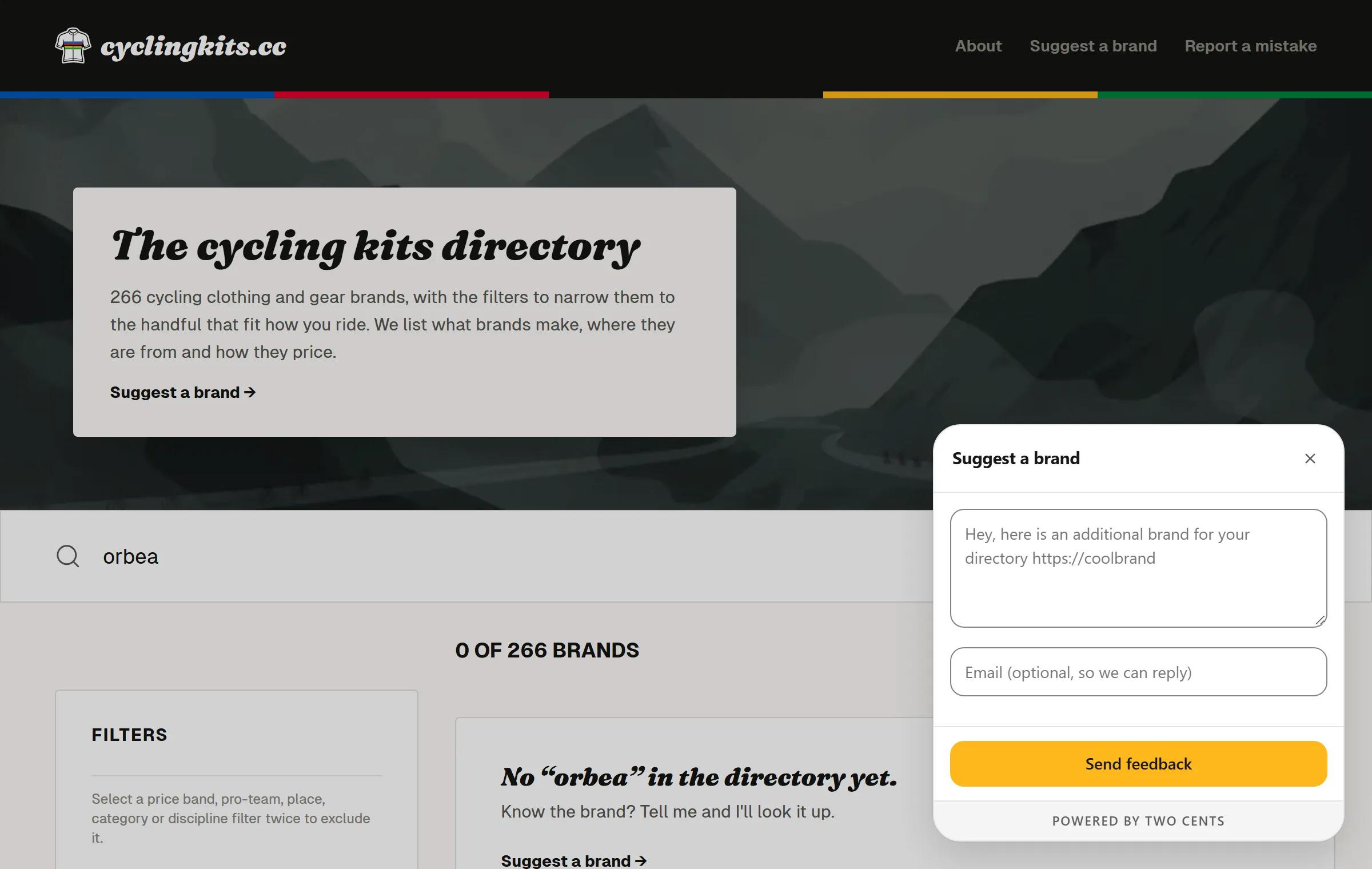
Between 13 and 21 September 2026 that question got 31 answers. Three of them came from the empty search page: someone searched for a brand I hadn't listed, found nothing, and named it on the spot. One answer, word for word:
Hey, here's an additional brand for your database: https://trikoterie.at/
Each answer arrived with the address of the page it was sent from, search terms included, so I could see what the visitor had typed. The same goes for a listing. "The opening hours changed in June" is only useful if you know which listing it is about, and the page address tells you.
Pages where people learn to use something
| Page | Question to ask there |
|---|---|
| Setup, the first time someone uses your app | Was anything unclear during setup? |
| What were you hoping to do first? | |
| A new feature | Is anything unclear at this step? |
| Does this do what you expected? | |
| Settings | Is anything missing from this page? |
| Help article | Is anything still unclear? |
| What were you trying to do? |
"What were you trying to do?" is the most useful question on a help page. The answer tells you which article the visitor needed, and it is often one you haven't written.
Pages where people read, or leave
| Page | Question to ask there |
|---|---|
| Blog post | What should I write about next? |
| Did I get something wrong? | |
| Changelog | Which of these matters most to you? |
| A feature's own page | What do you think of dark mode? |
| Cancellation | What made you decide to leave? |
| Is there something that would have kept you? |
Cancellation is the one place where I ask why outright. The visitor has already decided, so the question presumes nothing, and you may not get another chance to ask.
The dark mode question works better with a score. In Two Cents a question can ask for one to five stars above the answer, and ask the visitor whether you may show what they wrote as a testimonial.
How many to ask at once
One per page is enough. A page that asks three questions looks like a survey, and people skip surveys.
Across a site, start with two or three, on the pages where your numbers puzzle you most. Reword a question when its answers show that people read it differently from how you meant it. Once the answers start repeating, you know what you wanted to know and the question can go.
Putting a question on its page
With Two Cents, you write the question in the dashboard and it gets a key. Any link or button on your site opens it:
<a href="#" data-twocents-open="suggest-a-brand">Missing a brand?</a>
A question that concerns the whole site, such as "How did you hear about us?", can sit in the widget's own menu, with no markup at all. Your code can also open one at a given moment, when someone cancels for example. Questions live in the dashboard, so rewording one never needs a deploy. The answers land in one inbox with a filter per question, and export as CSV or JSON. The script tag and where it goes are on the install page.
If you're comparing tools, I put Two Cents next to Feedback Fish and Ybug, and listed eight in Best website feedback tools in 2026. A plain form does the job as well. I compared the two in Contact form or feedback widget.
What the answers won't tell you
The people who answer chose to. The 31 answers on my directory told me which brands were missing. They didn't tell me how many visitors looked for a brand, found nothing, and left without a word.
So I read answers as leads. One sentence under a pricing table is a reason to reread that table, and it proves nothing about how many visitors were confused.
Two Cents is free for one site and 25 messages a month, with no card. Your own questions are included.